

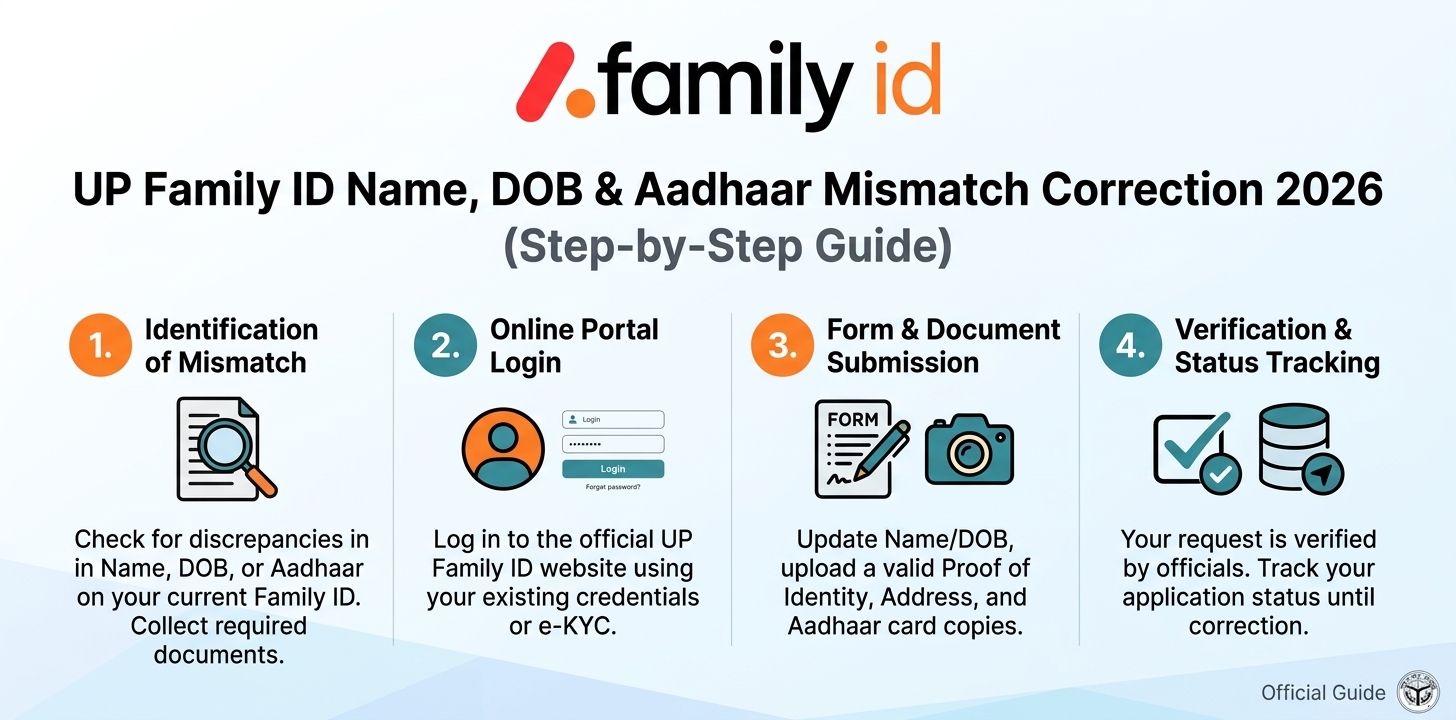
Making a mistake in your UP Family ID is more common than most families expect. A spelling error in a name, a wrong date of birth, or details that do not match the Aadhaar card can block an application or delay welfare benefits. The good news is that most of these problems can be fixed through the official portal without starting over.
This guide explains why mismatches happen, which documents to keep ready, and how to submit a correction request for your UP Family ID (Parivar Pehchan Patra). If you have not registered yet, start with our UP Family ID kaise banaye guide.
Important notice: This website is not affiliated with the Government of Uttar Pradesh. Always use the official portal at familyid.up.gov.in, and never share your OTP, password or Aadhaar details on unofficial websites.
Why Do Name, DOB and Aadhaar Mismatches Happen?
The Family ID system verifies each member against Aadhaar-linked data. A mismatch usually comes from one of these causes:
- Spelling differences. The name was typed differently from the Aadhaar card, for example a missing middle name or a different spelling of a surname.
- Wrong date of birth. The date entered does not match the Aadhaar record, or only the year matches.
- Old Aadhaar details. The Aadhaar itself contains an error that was never corrected.
- Typing mistakes. A wrong digit in the Aadhaar number, or a swapped day and month.
- Different name formats. Initials in one record and the full name in another.
First Step: Find Out Which Record Is Wrong
Before you submit anything, compare three things side by side:
- The details printed on the member’s Aadhaar card
- The details shown in your Family ID dashboard
- The details on supporting documents, such as a school certificate or birth certificate
If the Aadhaar is correct and the Family ID is wrong, you only need to correct the Family ID. If the Aadhaar itself is wrong, correct the Aadhaar first, then update the Family ID. Generally, updating the Family ID alone will not fix a mismatch that comes from the Aadhaar record.
Documents Usually Needed for Correction
Keep clear scanned copies ready. Requirements can vary with what you are correcting, but these are commonly used:
| What you are correcting | Commonly accepted documents |
|---|---|
| Name | Aadhaar card, school certificate, voter ID, passport |
| Date of birth | Birth certificate, school leaving or marksheet certificate, passport |
| Relationship to head of family | Ration card, family record or other official proof |
| Mobile number | Aadhaar-linked mobile number for OTP verification |
Use clear, readable scans. Blurry or cropped files are one of the most common reasons for rejection.
How to Correct Your UP Family ID Details
The exact screens and option names may change as the portal is updated, but the process generally follows these steps:
Step 1: Open the official portal. Go to the official UP Family ID website and click Login.
Step 2: Log in. Enter your registered mobile number or login details and verify with the OTP. If you cannot log in, read our login problem and password reset guide.
Step 3: Open the update option. From your dashboard, choose the option to update family details and select the type of correction you need.
Step 4: Select the member. Choose the family member whose name or date of birth needs to be corrected. To add or remove a member instead, see our add or delete member guide.
Step 5: Enter the correct details. Type the information exactly as it appears on the supporting document. Double-check spelling, spacing and the date format.
Step 6: Upload supporting documents. Attach the proof that supports the correction.
Step 7: Verify with OTP and submit. Confirm the request using the OTP sent to your registered mobile number. Save any reference or application number you receive.
Step 8: Track the request. Check progress regularly using our status check guide.
If the Aadhaar Itself Has an Error
If the mistake is in the Aadhaar card, the Family ID cannot be matched until the Aadhaar is corrected. In that case:
- Update the Aadhaar through the official UIDAI process, online with supporting documents or at an Aadhaar enrolment centre.
- Wait until the Aadhaar update is completed.
- Return to the Family ID portal and submit the correction request so both records match.
This order matters, because verification pulls data from the Aadhaar record.
What to Do If Your Correction Is Rejected
A rejected request does not mean you have to register again. Check the reason shown, then:
- Re-upload clearer documents.
- Make sure the spelling matches the document exactly.
- Confirm that the document you uploaded actually supports the change, for example a birth certificate for a date of birth.
- Resubmit the request with the corrected information.
For help with rejections and OTP errors, see our rejected application and OTP problem guide. If the portal keeps showing an error, visit your nearest Jan Seva Kendra or CSC for assistance.
After the Correction Is Approved
Once your details are updated, download your updated Family ID and keep a copy. If you want a refresher on how the whole system works, visit our UP Family ID guide homepage.
Tips to Avoid Mismatch Problems
- Copy names exactly as they appear on the Aadhaar card.
- Keep your Aadhaar-linked mobile number active.
- Verify every detail on the review screen before final submission.
- Save your application and reference numbers somewhere safe.
- Update the Family ID soon after any change in the family, such as a marriage or a move.
Frequently Asked Questions (FAQs)
Can I correct my name in the UP Family ID online? Yes. You can submit a correction request from your dashboard under the update family details option, along with supporting documents.
Is there a fee for correction? The official portal does not charge for registration or updates. Be careful with anyone asking for money to do it for you.
Can I change my date of birth if it differs from my Aadhaar? The Family ID is generally expected to match the Aadhaar record. If the Aadhaar date is wrong, correct the Aadhaar first and then update the Family ID.
How long does a correction take to be approved? Processing time varies. Track the status on the portal using your reference number.
Do I need to create a new Family ID to fix a mistake? No. Each family gets only one Family ID, so correct the existing record instead of registering again.
What if I cannot log in to make the correction? Reset your password using the registered mobile number, or ask for help at a nearby Jan Seva Kendra.
UP Family ID Correction: Hindi FAQ (संशोधन कैसे करें)
UP Family ID me correction kaise kare? आधिकारिक पोर्टल पर लॉगिन करें, परिवार का विवरण अपडेट करने वाला विकल्प चुनें, सदस्य को चुनकर सही जानकारी भरें, दस्तावेज़ अपलोड करें और OTP से पुष्टि करके सबमिट करें।
नाम या जन्म तारीख का संशोधन (sanshodhan) कैसे करें? सबसे पहले आधार कार्ड से मिलान करें। अगर आधार सही है और फैमिली ID में गलती है, तो पोर्टल पर सुधार का अनुरोध करें। अगर आधार में गलती है, तो पहले आधार अपडेट कराएं।
क्या UP Family ID update ऑनलाइन हो सकता है? हाँ, आधिकारिक पोर्टल पर लॉगिन करके कई जानकारियाँ अपडेट की जा सकती हैं। विकल्पों के नाम समय के साथ बदल सकते हैं।
संशोधन के लिए कौन से दस्तावेज़ चाहिए? नाम के लिए आधार कार्ड या स्कूल प्रमाण पत्र, और जन्म तारीख के लिए जन्म प्रमाण पत्र या मार्कशीट जैसे दस्तावेज़ आम तौर पर काम आते हैं। पोर्टल पर सही सूची ज़रूर देख लें।
संशोधन खारिज हो जाए तो क्या करें? अस्वीकृति का कारण देखें, साफ़ स्कैन कॉपी लगाएँ, नाम और तारीख दस्तावेज़ के अनुसार भरें और दोबारा अनुरोध करें। परेशानी हो तो नज़दीकी जन सेवा केंद्र से मदद लें।
क्या संशोधन के लिए पैसे लगते हैं? आधिकारिक पोर्टल पर इसके लिए कोई शुल्क नहीं बताया गया है। अगर कोई पैसे मांगे, तो सावधान रहें।
Final Words
A wrong name or date of birth in your UP Family ID looks like a big problem, but it can usually be solved with the right documents and a correction request made in the right order. Check the Aadhaar first, upload clear proof, and track your reference number until the update is approved.
Disclaimer: This website is not affiliated with the Government of Uttar Pradesh. The information here is for educational purposes only. Procedures and portal screens may change, so always confirm the latest steps on the official website.
